Showing posts with label finding inspiration series. Show all posts

Tuesday, July 23, 2019

Finding Inspiration Part 6 (final) by Alex

Hello Lovely Flair Enthusiasts!


Alex here with the next installment of my Lost Mojo (or Finding Inspiration) series!  If you missed the first five installments, you can find them here:
Part 1
Part 2
Part 3
Part 4
Part 5

Today I’m bringing you the final installment of the Finding Inspiration or “lost mojo” series.  This one will be about using challenges to find inspiration. 

There are many sites (usually in the form of a blog) which host weekly or monthly challenges.  Sometimes they’re specific like a different colour challenge each week or the type of challenge might vary.

Facebook Groups relating to scrapbooking or cardmaking or more general crafts sometimes have special challenges.  Some commonly found activities include some of the things we’ve already looked at like scraplifting and commonly sketches.  Others frequently found are things Tic TAC Toe (also referred to as bingo) (like noughts and crosses where each box contains a prompt or item to use and you can choose a line in any direction and must include those items), mood boards and many others.

In April, such a Facebook group for the store Anna’s Craft Cupboard were celebrating their 13th anniversary with a cyber crop.  There were plenty of games and challenges and I’m going to go back and complete one that I wanted to do at the time but didn’t get around to it.

There were two "Blind Crops” and for me, your pink, self confessed control freak. these are the most difficult of all!  A blind crop usually is most successful when completed “live” to eliminate the temptation to peek ahead.  The leader has everyone making a layout step by step according to their instructions!  Eg “cut paper B into a 6x8 rectangle and stick to top left of paper A”.  Supplies to have on hand are usually available for some time beforehand, although the level of detail often varies.

The designer of the blind crop I’m going to make is none other than Melinda Sweetman who is probably well known to many of you.

I’m pleased to say I didn’t cheat on terms of peeking at the finished layouts, but I had a tiny cheat which I’ll confess in due process!  The list of supplies was more or less straightforward - except I had 5 papers picked instead of 4.  One was from a paper pad and single sided, so more like 4.5! 🀦🏼‍♀️

Since I rarely pull ink, mist or paint when making up kits, I felt I could justify the “wait and see” approach” when it came to this step.

Not knowing when and how much of each paper would be used was driving me crazy!  After following the cutting and sticking for the pink and woodgrain papers, I pretty much was sure my remaining paper would be the blue/lilac striped one (in the photo cluster) and not the green one.


Once I figured out we were cutting photo mats came my cheat - not only did I use the two specified papers (would have been the woodgrain and the purple) but I decided to also cut a mat from my pink paper and my green floral “spare” paper and do messy offset mats.  I use a lot of paper layers and doing this was like a security blanket! 

At the point when texture paste was required, I went with a "frankenpaste" as I sometimes do.  I mixed Colour Blast in Snow White with Vicki Boutin’s iridescent glitter texture paste (which has a clear base).  I wasn’t super happy when it was drying a bit more translucent than I hoped after 2 steps.  Then I saw paste was required for a third step so I dried off what I had already done enough to put the stencil back exactly as it was.  I mixed a bit of Dreamweaver pearlescent embossing paste into my frankenpaste and after doing the third area I went back over the first two lightly.  This made for some thick paste and in hindsight I should have probably used a denser patterned stencil.

Here are the three pastes swatches separately.  The fine glitter in the Colour Blast is hard to see, but it's gorgeous! 

 
I also wasn’t thrilled with any of my mist choices, but didn’t want the fuss of mixing anything so I knew the shimmer pigment in Heidi Swapp Color Shine should show up even on darker paper.

I had to leave the layout to sit overnight so the thick paste could dry all the way through.  The waiting time and scant adhesive causing the pink and paper to lift a lot at the edges.  I decided to machine stitch for some extra interest.  It's subtle, but adds some texture.

I also had to stitch down the yellow Thickers (not my first choice, but I simply couldn't make the ascending letters of a scripty font work no matter what I tried. πŸ˜’

I fussy cut virtually the entire sheet of that gorgeous floral paper from Shimelle's Little by Little collection and eliminated the red flowers and kept the others.  While yellow doesn't appear in the background pattern, it definitely worked as an accent and gave me the option of yellow in the title since both pink and white alphas seemed to blend in too much.  I added the lion die cut from the same collection and some critters from Box of Crayons also by Shimelle hidden among the flowers since the photo was taken at the zoo even though the journaling isn't about the outing itself,

I left the choice of flair until later since I wasn't sure where the blind crop was going to take me.  I opted for the Captured set which was black on white.  The white was going to stand out and co-ordinate with the paste and I wanted to include some camera motifs in the embellishment clusters anyway.

I used the silver, holographic circles from the Thickers phrase set from Shimelle's Sparkle City and some sequins from Spiegelmom Scraps to finish


Embellish with Flair product used:  Captured


I'll see you again soon with something new!

Love, and embellish with flair!

Alex xx


Sunday, July 7, 2019

Finding Inspiration Part 5 by Alex

Hello Lovely Flair Enthusiasts!


Alex here with the next installment of my Lost Mojo (or Finding Inspiration) series!  If you missed the first four installments, you can find them here:
Part 1
Part 2
Part 3
Part 4

As we continue our journey through the last few examples of getting inspiration from other artists' work,  we have just two more ways to look at.  Well, there are probably a lot more than that, but we have to stop at some point, right? πŸ˜‚

Today we’re looking at a SKETCH.  A sketch is a (very) much simplified page design with symbols as a guide rather than a completed scrapbook layout to scraplift.  Sort of like the blueprints of a house rather than photographs of a fully furnished and decorated home!

Sketches come in varying levels of detail and there is something for every crafter.  You just need to figure out the level of detail you're after.

Search the same places for “scrapbook sketch” as we looked at in Part 2 of this series and see what comes up.  You can be more specific by adding number of photos etc into the search bar.

Today I’m going a little bit outside of my comfort zone and using a slightly different kind of sketch (for me), but it still has places to put lots of details and layers if so desired.

With this sketch, (like any sketch) you can follow faithfully or change it around. 

The sketch I’m using comes from Cocoa Vanilla Studios and it was used as a challenge for (inter)National Scrapbook Day.  Since I didn’t get around to using it by the challenge deadline I’ll use it today.


Their Face Book page has an album with all the sketch entries on to and I love seeing everyone’s different takes on the sketch.

I’m not sure how it came about, but I decided I was going to do a gaming layout, and I have a seemingly bottomless pile of those photos to scrapbook!  πŸ™ˆ  It was simply what was talking to me at the time! 🀷

I also started looking through paper that might work with the story and ended up in my Cocoa Vanilla section.  Subconscious decision being their sketch perhaps?  🀷  They do incredible boy collections and "Boys Rule" is probably my favourite very closely followed by "You Rock".  I mostly used these lines along with a few bits of the "Imagine That" boy line by Echo Park, a few Bella Blvd papers with gaming motifs and a few other random bits.


What does immediately strike me with the sketch is that there isn’t a designated spot for journaling and since this is critical for me, I need to figure this out before getting carried away with embellishing.


At this point you can decide how literally to take the sketch - to use exactly as many layers as the sketch or more or less?  To use the same number of embellishments (and maybe even the exact same motifs) or more or less?  I went with my typical multiple layers, multiple embellies and instead of girly motifs like butterflies and flowers, you can see how I was able to make this sketch work as a very boyish layout.

I’m going to be a little predictable and keep the photo on the designated photo spot (it looks best here since he is facing a little towards the left), so I can have fun with as many little embellishment boxes as possible!  You could also substitute some of the smaller squares for extra photos if you wanted to.

You could change the position of the boxes, mirror image the sketch, turn it upside down or change it to suit a different size page (eg 9x12 or 8.5 x 11).

The photo is this single, oddball, not-very-great-photo, but I never shy away from using these sorts of photos if they tell a story.  Using a sketch like this one I think slightly distracts from the imperfections of the photo, but I need to take care not to get it lost completely!  I printed the photo in both black and white and in colour.  Initially I preferred the b/w, but i definitely wanted to include red (which was in "You Rock", but not "Boys Rule" and a darker woodgrain since his bed takes up a fair amount of the image and it's a lovely warm brown timber sleigh bed.  "Boys Rule" had a great woodgrain paper which I used as a frame.  In the end I went with the coloured version.

I constructed all the little squares and the larger photo square separately before sticking them to the page (with the exception of a few finishing touches).  They're a great size for housing flair!  Metal flair badges have a great boyish vibe and give me the dimension and texture I crave on a layout.  More texture was added with machine stitching (yes, you can totally stitch right through the thickest chipboard frames and acetate and layers of paper...together even!).  You can also staple right through wood veneer elements! πŸ‘


I do struggle to use the various sized frames that come in embellishment packs or on their own.  I was determined to use as many as I could on this layout since the sketch really lent itself to them.  I pulled out frames in all kinds of finishes from acetate to chipboard to vellum.  I also seem to struggle with acetate embellishments especially those photo overlays by Crate Paper from at least five years ago.  I was determined to work some of those into my layers!


After trimming and adhering the white paper with the faux messy paint around the edge,  I decided I wanted to add some paste through a star stencil.  This necessitated masking off the woodgrain border (since the paste ended up being a bit of an afterthought).  I mixed white and pearlescent embossing pastes together as the pearl ones sometimes dry kinda silvery, but oddly my "franken-paste" dried kinda yellowish!  🀷 I also went to town with ink droplets in co-coordinating colours.  Most would end up covered and toned down.

I opted for embossing paste over modelling paste or texture paste since its the softest and knowing I was going to sew through it, it needed to have a bit of "give".  There was also the added benefit of popping up all my elements a little off the paper. πŸ‘

The down side is that if you're going to adhere anything to mixed media paste, you need a REALLY strong adhesive.  There are a few options, but my personal favourite is Glue Dots.  There are all sorts of Glue Dots for all kinds of purposes.  Permanent squares or dots (in the blue dispenser) are ideal to stick the finished squares to the background and also for adding embellishments on top of them like the flair, chipboard and wood veneer stars etc


Once I had the bones of my layout figured out, I put the sketch aside since there wasn't anything else I needed from it.  You may wish to do this sooner in your process if it diistracts or confuses you, or keep it in front of you right to the end.  There isn't a correct approach!

Three of the badges came from the "Gamer" set and I searched high and low for "Words 4" in my stash only to discover I don't have it yet (I think it's on its' way to me as we speak!) so I used one from "I Wanna Rock" to have 2 white and 2 black.

Gamer


After sticking the layered embellishment clusters and photo cluster to the background,  I came in with the bulky embellishments and then smaller stickers, words stickers and finally a few enamel dots.  The embellishment clusters were so much fun to put together, but they did take a little while to do.


Overall, I'd say I stuck to the sketch reasonably faithfully while still keeping the elements in my pages that make them mine.  I tend to stick to sketches fairly closely when I do use them.  To me it's the whole point of using them, but as I outlined above, there are plenty of other approaches.  Sometimes the way my photo is composed means I mirror image the sketch or rotate it in some other direction to suit the composition better.  

Here's the finished layout!

One Sided Conversation


Do let me know if you have any questions in the comments or want to talk about how you like using sketches!

Embellish With Flair products used:


Love, and Embellish with Flair,

Alex xx


Monday, June 17, 2019

Finding Inspiration Part 4 by Alex

Hello Lovely Flair Enthusiasts!


Alex here with the next installment of my Lost Mojo (or Finding Inspiration) series!  If you missed the first three installments, you can find them here:
Part 1
Part 2
Part 3

Today we continue to look for inspiration in work by others.  The natural progression from scraplifting would probably be a sketch, but there is something a little in between.  I'm talking about CLASSES.  Classes offered by other crafters.  These can be either face-to-face or online.

I love online classes myself as they can be worked through at your own pace and access is usually life long.  I regularly sign up for classes by other crafters.  BUT WHY?? I hear you ask! You TEACH classes, so why TAKE classes?? πŸ€”

Well everyone's style is different.  I believe that you never stop learning and if you don't try something new, you'll never know whether it's "your thing" or not.  Even the most well known crafters or artists can misplace their mojo for a time, and taking a class can reignite it (not to mention supporting fellow artists).

Today's layout takes inspiration from Lesson One from a class I recently signed up for called "A Touch of Whimsy" by my dear friend Sara.  Before you ask, no I didn't sign up JUST because she's my friend!  Her style is VERY different to mine and I love what she makes, but it's definitely out of my comfort zone.

πŸ’‘Tip: Getting out of your comfort zone could be just what you need to get that mojo back!


I figured I'd better practice what I preach and since the last layout was a scraplift of Shimelle's (and I've taken many of her classes) which is very much within my comfort zone, I should probably show you something different!

One thing Shimelle does say about scraplifting or trying something quite different is that you still want to make it look like YOU made it when someone flips through the pages of your album. 


As a general rule.  if you've never taken an online class before, it's totally OK (and usually encouraged) to share what you make online and across the socials.  What's NOT OK is to share the actual videos, PDFs and images of the artist's layouts.  This is why I can't show you Sara's actual layout.  You may know her as Sara Scraps across the socials, but she put this little SNEAKY PEEK on her Insta so you kinda get an idea what it's about.

What do you think of when you hear the word "whimsy"?  Go ahead and tell me your thoughts in the comments.

My thoughts are:
Organic shapes rather than geometric
Curves vs sharp angles
Butterflies
Flowers
Hearts
Clouds and floaty stuff

Sara's first lesson in the class focuses on hand stitching or alternatives if you don't like to stitch.  As soon as I saw this I knew EXACTLY which photos and story I wanted to use.  I had set them aside for a layout I DID plan to hand stitch!!  What I hadn't planned on was having to SKETCH my stitching lines! 😬

Plan A was to ask my SmallCraftyDude to help, but he refused point blank upon learning I required hearts.  πŸ™„

Plan B was to use a cut file.  Paige Evans has many cut files with the holes already there for stitching, or use the pen holder in the Silhouette to get it to sketch the design in pencil and I poke the holes myself,  That's almost like not cheating, right?  πŸ˜‰

Plan Q, R or perhaps S was to put on my Big Girl pants and get on with it.  Sara gave me such encouragement (and I realized I wouldn't be setting the best example by cheating), so a whole white eraser later I decided to start poking holes before I changed my mind. πŸ’ͺ

So, what I had in my head was inspired by this layout by Flora Farkas using one of Paige's cut files.  Except I wanted more whimsy...and I promised I'd draw it myself.  You'll see how I take inspiration from Flora's layout without exactly scraplifting it, but it does incorporate at what we looked at in the previous post about scraplifting with this one.  While I'm not exactly scraplifting the layout Sara made in Lesson 1, it's a sort of mix of hers and Flora's and turning out to be unique in its own right. 

I needed both pink and purple so it would draw attention to the colour of the dresses my nieces are wearing in the photos.  The colour is pretty washed out being taken indoors with less than ideal lighting so I wanted to draw attention to it.  The story behind these photos is about their outfits as we watched the royal wedding last year at a high tea my sister organised.

Naturally there are flairs for every possible occasion in the Embellish With Flair shop and this set called Royal Crowns even had the perfect name! 😍😍😍


The background needed to be subtle.  A white tone-on-tone was definitely on the list, but I've always swooned over this subtle yet gorgeous ombre Paper 8 from Paige Evans' "Take Me Away" collection 😍


It’s at this point where I normally start layering photo mats like crazy.  I wasn’t sure what to do here.  I didn’t want the photo block to look too heavy, but I did need to add my own touches to make it my own.  I don’t usually stack multiple photo mats ups evenly.  It looks really formal and just not “right” for most of my stories.  And another thing - I’m not sure I could stack anything evenly if I tried! πŸ˜‚πŸ€·

πŸ’‘Tip: You don't have to copy a sketch, scraplift or class lesson down to the last detail.  You want to find the balance between trying something new and still being true to your style.

Since I was trying to keep the photo block reasonably small (not to cover too much of the painstakingly stitched background raiding my box of scraps (when a certain cat isn’t holding them hostage) is a perfect opportunity to pot a small dent in them!

Then I went through my die cuts and stickers and pulled out what I felt qualified as “whimsical”. I found a couple of frames from Paige Evans’ collections.  I struggle to use frames, but this time I was determined.  I backed them with patterned paper as I would a cut file and they formed a kind of bridge between the paper mats and the embellishments clusters.  

I love how most of the embellishments are small and paper based (die cuts or fussy cutting or stickers.  It makes them less heavy and more "whimsical".  I only used a single piece of chipboard and tried to keep the non paper elements delicate.

I was trying to be a little restrained there as well since part of the class lesson was to scatter little floaty bits along the stitched areas. I stitched down two butterflies with a cross stitch and attached the tiny metallic butterflies


The butterflies help make a connection between the metal flair and the more whimsical floaty elements and help them look more "at home".

Placement of embellishments was kind of decided for me since there were many areas of the stitched chains of hearts I was unhappy with. 

I put the journal in the space underneath in grey to make it less intrusive.  It’s more legible IRL I promise!  I picked an older set of Thickers by Dear Lizzy (going back to her Polka Dot Party collection) in white (trying to be soft and subtle yet girly at the same time).  Hands up if you have the song from Princess Diaries 2 in your head when you read the title? πŸ™‹πŸ˜‚


Since I was unable to decide between pearls or diamantes,  I used both!  Plenty of royal jewels mix the two so on they went!  I was in two minds as to whether to add any gold mist.  I know I’ve been doing a lot of it lately, but there is a bit of gold in the die cuts and stickers so I went with it.

Here's my final outcome and I'm not entirely displeased with it!  πŸ˜‚πŸ‘

It was a labour of love.  Most importantly,  I achieved my aim by started off with something which looked very different to what I'd normally make, yet I was able to mould it into something that looked like it was my work and included all the things I loved...and all from taking one class!

I do encourage you to try this approach whether it be Sara's class, a different online class or a face-to-face class if you are fortunate enough to be close enough to someone who offers them!

Crowning Glory


 Embellish With Flair products used: Royal Crowns


That's it for today!  Hope to see you again soon with another installment in the series (I promise we're almost done!)

Love and Embellish With Flair,

xx Alex

Friday, May 31, 2019

Finding Inspiration Part 3 by Alex

Hello Lovely Flair Enthusiasts!

Alex here with the next installment of my Lost Mojo (or Finding Inspiration) series!  If you missed the first installments, you can find them here:
Part 1
Part 2

So what are we going to discuss today? I honestly didn't expect this to become quite the epic it has, but I'm hoping you're enjoying it (or at least the lovely flair on my layouts πŸ˜‰)

This is the bit when I think it's worth talking a bit about finding inspiration from OTHER PEOPLE.  I guess you'd say it's like pulling out the big guns if you're really stuck, or perhaps you always do this and there's nothing wrong with that.  There is one golden rule as far as I'm concerned, though and that it to always acknowledge your source or inspiration

There are various ways you can be inspired by other crafters - using a sketch created by someone else, "scraplifting" a finished layout or perhaps taking a class offered by another crafter.  I regularly use all three methods.

Sometimes, my chronic illness doesn't allow me to do the entire process so through trial and error I found that when I need to buy some time or energy, taking this first step out of the equation for me is key to having a finished layout and story told.

Today we'll have a look at scraplifting.  What's "scraplifting" I hear you ask?  While I dislike the term (it implies stealing), it's effectively copying someone else's project.  We're taught that's a big NoNo at school, but that's why people share their work online.  When you find a layout by another scrapbooker that you'd like to reproduce, or get inspiration from, there are endless degrees to which you can do this.

The layout I'm scraplifting is by Shimelle Laine.  Her "style" is pretty close to mine so I often am inspired by her work.  The layout I'm "scraplifting" is a few years old and can be found HERE.  I really recommend you have a look at it first.

Now I could reproduce this layout exactly if I wanted to since I have all the exact same supplies in my stash (I know! 🀦).  I've never done this though!  Not that her layout isn't perfect as it is, but I personally don't want mine to be a cookie cutter replica.  Where's the creativity?  Talking about creativity may seem like a luxury when your mojo is MIA, but I promise, once you get going you will see that your page starts to develop a mind of its own even if it's a pretty close scraplift.

I'd call mine pretty close.  I guess for me it is since I know how far (or not) I end up when I do this.  There are loads of examples on my blog.  If you click on the word "scraplifting" at the bottom of a post on my blog when I use it (like this one), it will bring up more entries.

You might deviate a lot more (and I have a layout in progress where my scraplift took on a mind of it's own which I will post when I revisit this topic later) or a lot less.  Both are absolutely OK!

So where to start?  The easiest way to stay true to the original is to choose a photo which is roughly the same size and orientation.  In this case it appears to be 4x6 in landscape.  Mine is a touch smaller.  The next thing is to pick supplies, but I do find that when scraplifting, the layout does tend to evolve so it's never quite that simple.

My process for this exercise was to first decide on my background paper.  I did toy with navy, but if I was going to use the black and white "Cats" flair badges I'd have to include at least some black which can be a challenge with navy, though not impossible.  I ended up choosing a dark grey which bridged the gap between black and the colour of the grey cat.  I also wanted the focus to be more on the colours of the box. 


If you read Shimelle's blog post and journaling, you'll see that rainbow and colour overall play a key aspect in her story, whereas in mine, the story is about the box in the photo, so emphasizing those specific colours made sense, but I did want to include somewhat of an array of bright colour (especially red of the box (and to a lesser extent blue)). 


Since my photo had far fewer colours than Shimelle's, and that initial pop of rainbow is what makes the dark background so striking, I did want to include some multicoloured paper with black (OK so it could be a very very dark navy in the triangle pattern but reads as black) as well as incorporating all the other colours I planned to use. 

I also ended up having to use more layers because it just didn't look "right" with fewer. 

 
This is what I mean when I say the layout starts taking on a life of its own!  I had to go back and search for various colours and add them in a few times! 

As you can tell, I deliberately curled up loose corners for texture!

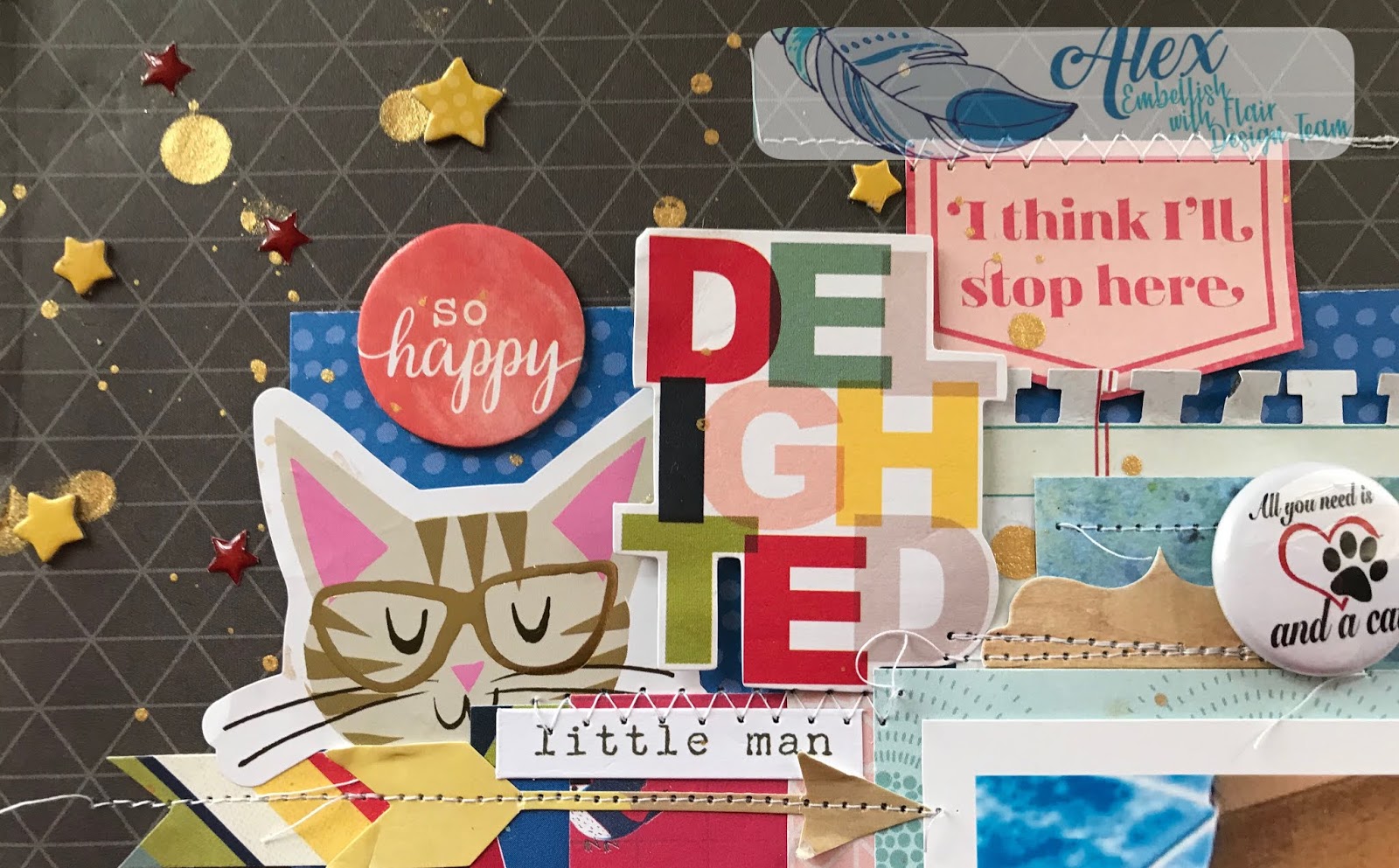
I was also thinking embellishment at the same time.  I did want to use that same "delighted" die cut since it's a word frequently used in Regency society and had all the colours I was going to use! 

I wanted to use stitching like Shimelle, although mine was more for decorative purposes (except in a couple of places) rather than holding down notorious chipboard!  I like leaving loose threads if it suits the layout and anything to do with cats suits since they like string and yarn.


I wanted to use some gold also as a nod to the Regency era, so gold mist and gold detail on some of the embellishments worked with the Thickers.  Also...if you're going to stitch, make sure said mist is totally dry or else you'll have to cover up the smudges with the chipboard and enamel stars!! 🀦🀦🀦

I positioned the badges around the photo and picked mostly white ones to stand out.  I did have to use the one with a touch of red to again go back to the original chicken box element of the story!  Also, my son calls him "little man" so that sticker on the top left was perfect in all aspects. 

I'm sure you can figure out the connection between cats and birds/feathers.  It's one of the few times I use bird paper since I have a phobia and aversion to the things and quite frankly the connection freaks me out further, but 🀷.  Shimelle jokes that I'm the only one allowed to disike the birds she has included in her last few collections! 😳😳😳

Most people wont have any idea that all these little decisions relate to the story and my memory of the event, but I love all these little connections and they really make the memory complete in my mind.

Speaking of story...that cat is named Fitzwilliam (after the heartthrob hero), and there is also a character in the novel called Colonel Fitzwilliam!  Not who he was named after, but a good pun in light of the story being about the box!


So can you see how while I have scraplifted a layout, I've also used elements from the Part 1 and Part 2 of this series as well to help make the layout my own and just let the initial inspiration take me where it was going to lead. 

Colonel Fitzwilliam


Well thanks for sticking with me and hope to bring you another way to find that lost mojo very soon!

Embellish With Flair products used: Cats set


Love, and Embellish With Flair!

--Alex xx

Tuesday, May 21, 2019

Finding Inspiration Part 2 by Alex

Hello Lovely Flair Enthusiasts!

Alex here with the next installment of my Lost Mojo (or Finding Inspiration) series!  If you missed part 1 you can find it here.

Today we're talking colour.  I absolutely love colour and don't shy away from throwing lots and lots of it on my layouts!  So how can we use colour to get us out of a creative rut?

Are you a crafter who needs to start with a basic staple like white cardstock each time or do you prefer colour and or pattern? 

You can still be inspired by colour even if you are, for example, a white-sheet-of-cardstock-as-a-base scrapbooker.  You just need to keep this in mind while you pick out your other supplies in your chosen colour scheme

There are plenty of colour palettes all over the internet like Pinterest (we’ll touch on Pinterest a bit later) where someone else has come up with a selection of colours (usually to go along with an inspirational image.

You may wish to take colours from your photo, but you don’t have to.  It may seem like a strange idea, but it can work really well especially when the colours in your photo don’t relate to the story as it happened in your head or reflect how the event really was.  (Today’s layout is one of these!).  For example, a photo taken on an overcast wedding day (especially of its of guests rather than the bride and groom) wouldn’t be true to the story if created with similar colours!

So where to begin if you want to use colour to get your mojo going again?  Are there any specific colours that relate to your story or memory?  Today’s layout is one of many layouts of my son’s year 6 graduation.  I use his school colours throughout his “school” album: purple, aqua/turquoise and black.  I also use a fair bit of grey since it's one of my favourite neutrals and the boys’ school uniform has a lot of grey.  This doesn’t mean each page in that album uses those colours and only those colours.  Usually it incorporates one or more colours mixed with others to make new combinations while still giving a sense of continuity.

Doing a Google search for color scheme or colour palette (followed by the name of at least one colour) can give you sites like Magnet Street or Design Seeds for example. With colour palettes created by other people,  I prefer to search Pinterest and make boards for various albums where I have recurring colours. 

There are also sites like Coolors where there are random colour schemes constantly generated,  you can enter a colour to filter the colour schemes in the database,  adjust shades and hues,  pick colour schemes based on a photo and so much more!

I find that searching Google or Pinterest for one colour at a time gives better result than entering the whole string, but definitely try both and in between options.

So…for today’s example I did just that, but not at the very start of my process.  Firstly I got an idea when I saw these Embellish With Flair purple star badges.  I use stars as a motif in the school album, but even more so in the graduation photos.  For some reason I thought of cut files with a star in place of a letter like this super star cut file by Paige Evans.  I don’t use cut files on all my layouts, but it fit beautifully in one of his graduation layouts.  Especially when the star is turned into a shaker!! 

I decided to look through some of Paige's collections as a starting point.
πŸ“Tip when you get stuck: if you’ve made one decision, stay with the same manufacturer or designer as a starting point.

I got really excited when I saw paper 11 from Turn the Page collection.  Then I saw paper 19 and decided I was found to fussy cut both papers.  The back of this paper co-ordinated beautifully and I toyed with using it as a background, but I wanted my cut file and stars to stand out and the stripes might compete too much with everything else, but I hadn’t ruled it out.

In any case, the fussy cut stars in the “wrong” colours could be turned around and used anyway!  I did want more than just the aquas, greyish blues and greens.  I hoped to add purple and possibly something else.


I searched Pinterest for the terms colour palette and colour scheme with each of the colours and saved anything that grabbed my attention.  I really wanted to see how purple would look with these colours in an actual example to confirm how it linked up in my head.  Lots of times I imagine something and it simply doesn’t translate to paper the way I thought.

Most of the search results that come up on Pinterest are from Design Seeds.  You can visit their website directly and what I love most is that there is an image along with the colours they chose, so you can use the image and add more options for yourself.

 What I love about Pinterest is that you can make a board (even a secret one if you don’t anyone else to see it) and save what grabs your attention.  Like this cat.

It more or less had the colours I was after.  Another one of Paige’s collections has a very pale purple, but I wanted something a bit bolder so I kept looking and found these other palettes.


I figured that between the three I was set.  I was a bit disappointed not to find a new colour, but when I thought about all the shades of the ones I had, I probably had enough.  The exact greens in some of the palettes are way off, but it gives the general idea.  A more muted green needs a more muted purple, but in the case of this…the lime green goes really well with the bright purple.

So back to my layout.  I use a nested star cut file of Paige’s and cut different sized starts on the silhouette out of mostly purples, but a few more greens and aquas to.  I tried to pick papers where I could use both sides.

I cut my title and printed my photos then took a punch or two to the scraps to get some tiny and medium stars.


Shaker Pocket and backing the cut file - done!

Stitching some of the stars together for texture and interest - done


Once everything was in position, I used a ruler to mark out the area for the starburst and stuck down the stars.

I used the flair badges to make the centres of the letters such as R and P since they didn’t have them and the stars on the flair badges co-ordinated with the shaker pocket star A.  It's a lot of flair in a concentrated area, but they definitely stand out!

As much as I love piling on the embellishment, this page didn’t need a whole lot.  I used a little bit (for me), but even so, the whole page is practically covered which is NOT what I had in mind!  The title isn't the best choice for the specifics of the story.  On the surface it's about that bear, but on a deeper level it's about our relationship and I always think of him as my buddy and my superstar so while other stories of the night might have been better suited to this title, it's certainly not totally out of place.


Mama's Super Star


Embellish With Flair Product used: 3 Tone Stars Purples


That's all from me for this installment.  I hope it made sense.  Colour is such a vast topic!  If you have any questions, comment below! 

Love and Embellish With Flair,

-Alex xx